The New York Times published a story about the “words of 2012,” and I was interested to see nomophobia on the list: “Fear of losing or forgetting one’s mobile phone, or of being outside of the phone’s signal area. From no more (phone|phobia).” I wrote about nomophobia after Hurricane Sandy, when so many of us were coping with the lack of power (and connectivity). As I wrote in the column, I’d received an email about nomophbia from a treatment center, pitching a story. “Studies show that two-thirds of the population suffers from nomophobia,” according to the e-mail, which was about a program to treat the condition at Morningside Recovery Center in California. “As new mobile devices and technology hit the market, nomophobia is increasing, and up 13 percent from a couple of years ago.” Check out that column and a followup one.
Author: Allan Hoffman
The benefits of quitting Twitter
I’m on Twitter. I post to Twitter, but not a whole lot. It’s not really my thing. And it’s partly not my thing because, like a lot of social media, it seems to put me in front of other people’s agendas and take me away from my own.
I’m not quitting Twitter (I don’t need to, as I don’t use it all that much), but another writer, Adam Brault, did just that, and he reported on the effects.
The first evening off Twitter, I felt a level of peace I hadn’t known in some time. I just hung out with Kristi, danced with the kids, and read a book to myself for a very long time. Even though I found it surprisingly easy to give it up, it truly was an addiction, to be honest: until that night, I felt obligated to check it—and often, despite whatever I was in the midst of being more important in terms of my stated priorities.
Twitter is a distraction machine. If you ever want to read something interesting, you’ll find it there. We’re awash in interesting stuff. But the real challenge? Tuning it out. Or, really, being willing to tune it out. Because if you want to do something meaningful, whether it’s be with your kids or write a book, you’ve got to tune out the incessant drumbeat of “You must read this, and this, and this.”
As Brault later writes: “I used to believe that time was the most important thing I have, but I’ve come to believe differently. The single most valuable resource I have is uninterrupted thought.”
Tips to stop annoying Facebook notifications and quirks
 I’m fed up with Facebook, and I’m not alone. Am I willing to leave Facebook? To just delete my account and be done with it? Well, not quite. But recently I decided to go ahead and take the time to answer three or four of my questions about Facebook’s annoyances, like those pesky email notifications I always seem to get about people adding stuff to my timeline.
Do I send a text? An email? Make a phone call? Coping with Appropriate Communication Syndrome (ACS)
I recently wrote a column about what I labeled Appropriate Communication Syndrome (ACS). Here’s my definition:
It is the condition of being uncertain about the appropriate way to contact and communicate with another individual. The condition is sometimes accompanied by confusion, social anxiety, an inability to act and self-questioning. Certain individuals appear immune from the syndrome, and consequently communicate with excessive frequency.
I’m sure you’re familiar with this phenomenon. (By definition, blog readers suffer from ACS.) You want to contact someone, but then you start to think: Should I send email? A text? Or would Facebook be better? Right now, I’m waiting to hear back from a high school friend — I sent her an email about getting together — and I’m realizing a phone call might be better. But it’s hard to keep track of this, what with our communications preferences shifting all the time. As I say in the column, “Before the internet, there was the phone. The main issue was whether or not to leave a message on someone’s answering machine. That was it.”
Things sure have gotten a lot more complicated.
What is a notebook?

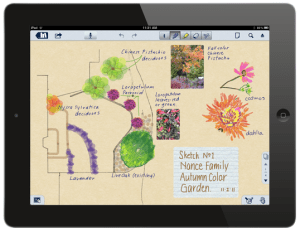
I love notebooks, and lately I’ve been experimenting with new types of notebooks, made possible by the portability (and multimedia capabilities) of the iPad and other tablet computers, as well as smartphones. As I wrote in a recent column, these apps make the most of the iPad’s capabilities — the handheld screen, the microphone, the ability to use a stylus and grab images from your photo library — to turn the notebook into something more “Matrix” and less Moleskine. They’ve got a lot going for them, but I haven’t really settled on one that I use on a daily basis. The issue? For me it’s finding something that’s truly simple — that doesn’t really make me think about how to use its various features — and yet provides a lot more than just a legal pad or a simple text-based note-taking app.
Twitter is everywhere, including in blog posts
I just updated to WordPress 3.4, and it seems there’s a new feature where you’re able to embed tweets right in posts just by typing a link.
So. Let’s give this a whirl. Here we go…
By the way, you’re able to get the URL for an individual tweet by expanding the tweet and then clicking on the “Details” link.
I really love the Paper app for the iPad
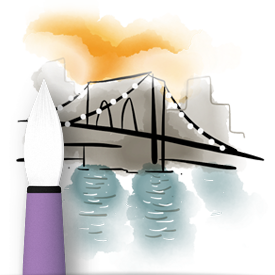
I’m into sketching, but I don’t do it as much as I’d like, and I’ve had a tough time making the transition from traditional tools (like a pencil or watercolor paints) to digital art tools.
Until now, that is.
A new app for the iPad, Paper, makes it very, very easy to keep sketchbooks and use its relatively streamlined tools. Rather than giving you lots and lots of options, like many other drawing and painting apps for the iPad and iPhone, Paper keeps things exceptionally simple. Here’s a video to check out.
Facebook buys Instagram. Is Tumblr next?
A Guardian story rounded up likely acquisition targets among tech startups, following Facebook’s $1 billion purchase of Instagram. It’s an interesting read — and a troubling one.
I’m not particularly happy about the Instagram/Facebook deal. After all, Facebook is already tied into so many services through its “like” buttons, Facebook Connect login service, and apps connected to the Facebook Timeline.
But what really hit me in the Guardian story was the suggestion that Google might buy Tumblr. I’m a big fan of Tumblr (that’s where I’ve got my iPhone photography blog, What I See Now), and I really (really!) don’t want to see it owned by Google. In fact, I’d probably rather see Facebook buy it. Why’s that? Well, if Google bought it, it’d be all about tying it to Google+, and that’s a service I don’t use and have no plans to start using.
Tumblr, please: Stay indie!
Fewer gadgets, but more accessories: 10 accessories for your mobile device
Like lots of people, I love to accessorize my iPhone. Our smart phones have made it possible to carry fewer gadgets (no camera, no iPod, no organizer), but we carry lots of accessories. In a recent column, I wrote about the craze for accessories for mobile phones, tablets, and e-readers. There are plenty of over-the-top accessories, and lots of handmade ones — just visit Etsy for a look at those. I note ten accessories to consider — an idiosyncratic mix of the useful and the unusual.
As I say in the column:
An entire industry has emerged to accessorize the latest generation of mobile devices. You can easily spend far more money on accessories, some of them made out of rare woods and handcrafted leather, than you spent on your gadgets. Some accessories are available for just about any mobile device, but many are tailored to a specific model: In general, there are more options for Apple’s popular iOS devices — that is, the iPhone, iPad and iPod Touch — because there’s none of the fragmentation resulting from having multiple device manufacturers and models.
My favorite? It’s the Aquapac, a $30 enclosure for taking your phone in the water. Want to see it in action? Here’s a video where I take my iPhone into the ocean.
Is the iPad the new “board” for Monopoly and other board games?
Is Monopoly doomed? Sometimes it seems like it, with our attention shifting to the Wii, smartphone games, and all of the entertainment available on the iPad and tablet computers. But maybe, just maybe, tablet computers will become the board for a whole new generation of board games (as well as new versions of all-time faves). That’s what seems to be happening, as I wrote in a recent column.
The iPad isn’t out to destroy traditional board games, but it is appropriating them—and reinventing what a board game can be. A generation from now, that standard feature of many homes — shelves stacked with board games in tattered cardboard boxes — may be a relic of the past. All of your faves will still be available, just in a super-charged form, and on the same device, a tablet computer.
I see this happening in my own home. I love the traditional Scrabble set, but why use it when you can have the iPad on the table and just put it away for a bit if you want to take a break from the game. Tablet games, after all, have a number of advantages: They keep score for you, there’s no cleanup, and you don’t have to worry about losing tiles or game pieces.
 ALLAN HOFFMAN